
Settings
The interface keeps its settings in its own flash memory, so they stay with the interface when you unplug it, move it to another computer or update the firmware. Change them in the DMX Core USB Interface Utility with Settings…. Click Save to store them on the interface, or Defaults to fill in the factory values.
The less common settings are under Advanced… at the bottom of the dialog.
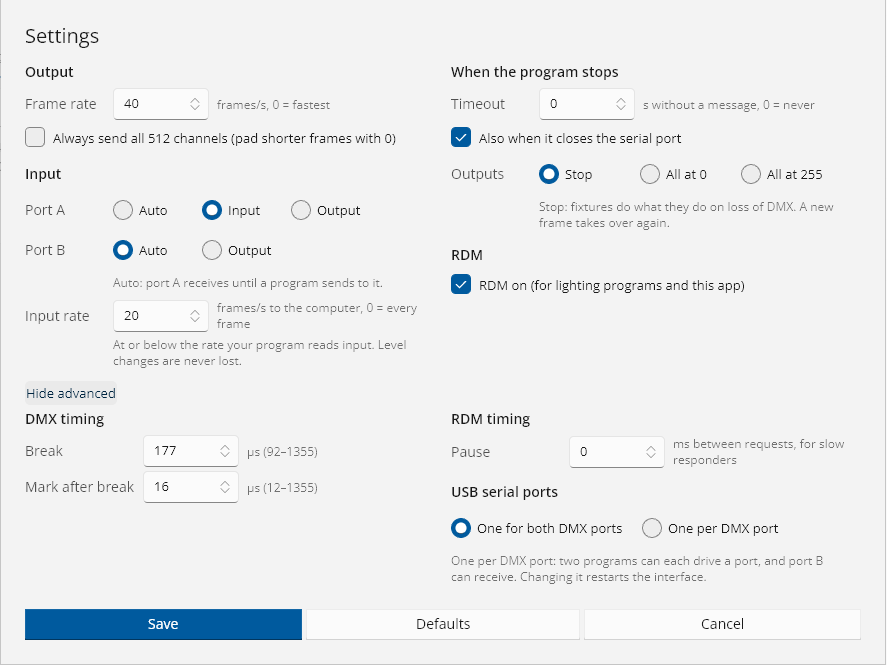
Output
| Setting | Default | What it does |
|---|---|---|
| Frame rate | 40 | DMX frames per second on each output, 1-40, or 0 for as fast as the frame length allows. The interface repeats the latest frame at this rate on its own, whatever the computer is doing. |
| Always send all 512 channels | Off | Pads shorter frames from the software with zeros, for fixtures or receivers that expect full frames. |
Software can set its own frame rate and DMX timing while it has the interface open. That lasts until it closes the serial port; the next program starts again from these settings.
Input
Port direction
| Value | Port A | Port B |
|---|---|---|
| Auto (default) | Receives until a program sends to it, then sends | Sends once a program sends to it |
| Input | Always receives. Output frames for the port are dropped. | Always receives (needs a serial port per DMX port to reach the computer) |
| Output | Sends once a program sends to it, and keeps sending | The same as Auto |
Set port A to Input when software keeps sending output frames to a port you want to use as an input. A change applies at once.
Port B is on two-port hardware such as the DMX Core Pico 2. It offers Input when it can receive, which is with a serial port per DMX port.
Input rate
Default 40. The most received frames per second sent to the computer, 0-100, or 0 for every frame. A console can send 250 frames a second or more, and some software reads only one input message per output frame. Keep this at or below the rate your software reads input. Level changes are never lost: a frame that arrives too soon is replaced by the newest one and sent in the next slot.
When the program stops
What the outputs do when the software stops sending: it closes the serial port, or nothing has come from it for a set time.
| Setting | Default | What it does |
|---|---|---|
| Timeout | 0 (never) | Seconds without any message from the software before the outputs stop. |
| Also when it closes the serial port | On | Stops the outputs as soon as the software closes the serial port. This works only with software that turns on the serial port’s DTR line when it opens it; for other software, use the timeout. |
| Outputs | Stop | Stop: the outputs stop sending, and fixtures do what they are set to do on loss of DMX. All at 0 or All at 255: the outputs keep sending with every channel at that level. |
The next frame from software takes over again. After a stop, port A on Auto listens again, so the next program can use it as an input.
The timeout is off by default on purpose: some software (OLA, and Lightkey through it) only sends a frame when a level changes, so a static look would look like software that has gone away.
RDM
| Setting | Default | What it does |
|---|---|---|
| RDM on | On | RDM for lighting software and for the utility. Turn it off if software has trouble with RDM; the interface then tells software it has no RDM. |
| Pause (Advanced) | 0 ms | The least time between the end of one RDM request and the next, 0-1000 ms, for fixtures that need a moment between requests. |
DMX timing
Under Advanced….
| Setting | Default | Range |
|---|---|---|
| Break | 177 µs | 92-1355 µs |
| Mark after break | 16 µs | 12-1355 µs |
The defaults suit almost every fixture. Change them only for equipment that needs a longer break or mark. RDM requests always use timing within the RDM standard, whatever these are.
USB serial ports
Under Advanced…. Only on two-port hardware, such as the DMX Core Pico 2.
| Value | What it does |
|---|---|
| One for both DMX ports (default) | One serial port. Port A uses the Enttec messages, port B a two-port extension message. |
| One per DMX port | Two serial ports, one per DMX port, each a complete one-port interface (DMX Core Pico 2 A and DMX Core Pico 2 B). Two programs can each drive a port, software that uses one port per interface can use both, and port B can receive DMX. |
See A serial port per DMX port for how the two serial ports behave. Changing this setting restarts the interface. Software that has it open loses its connection while it restarts. On Windows, the second serial port gets its own COM port number.
© 2026 DMX Pro Sales, LLC. All rights reserved. DMX Core is a registered trademark of DMX Pro Sales, LLC. Other product names are trademarks of their respective owners.