
Stream Routing
Stream routing turns the DMX Core 100 into a live router: DMX it receives on the network or a DMX input port goes straight back out on every output mapped to the same slot id, including plugin outputs such as Govee, LIFX, WiZ and Shelly bulbs. A console or lighting software sends sACN or Art-Net, and the DMX Core 100 converts and fans it out, while its own cues, presets and fixture control keep working alongside. Several input protocols are routed at once, so a console on sACN, another on Art-Net and a DMX-512 input port can all be live together.
Typical uses:
- Drive smart bulbs and other plugin outputs from a lighting console that only speaks sACN or Art-Net.
- Convert between protocols: sACN in, Art-Net, KiNet, TPM2.net or DMX-512 out.
- Bring several sources together: a console on sACN, a media server on Art-Net and a wall panel on DMX-512, each on its own slots.
- Reshape the routed data with Channel Rules: cap a fixture the console drives too hard, or send one RGB color on three channels and repeat it over a whole pixel tape.
- Keep a console live on a rig that the DMX Core 100 also runs cues and schedules on. Both merge by priority.
Stream routing is different from the Passthrough of the 2-port DMX-512 board: that one is done in the port’s firmware, port to port only, and does not merge. Both can be on at the same time.
Setting it up
Everything is on Lighting Setup › Inputs in the Web UI.
-
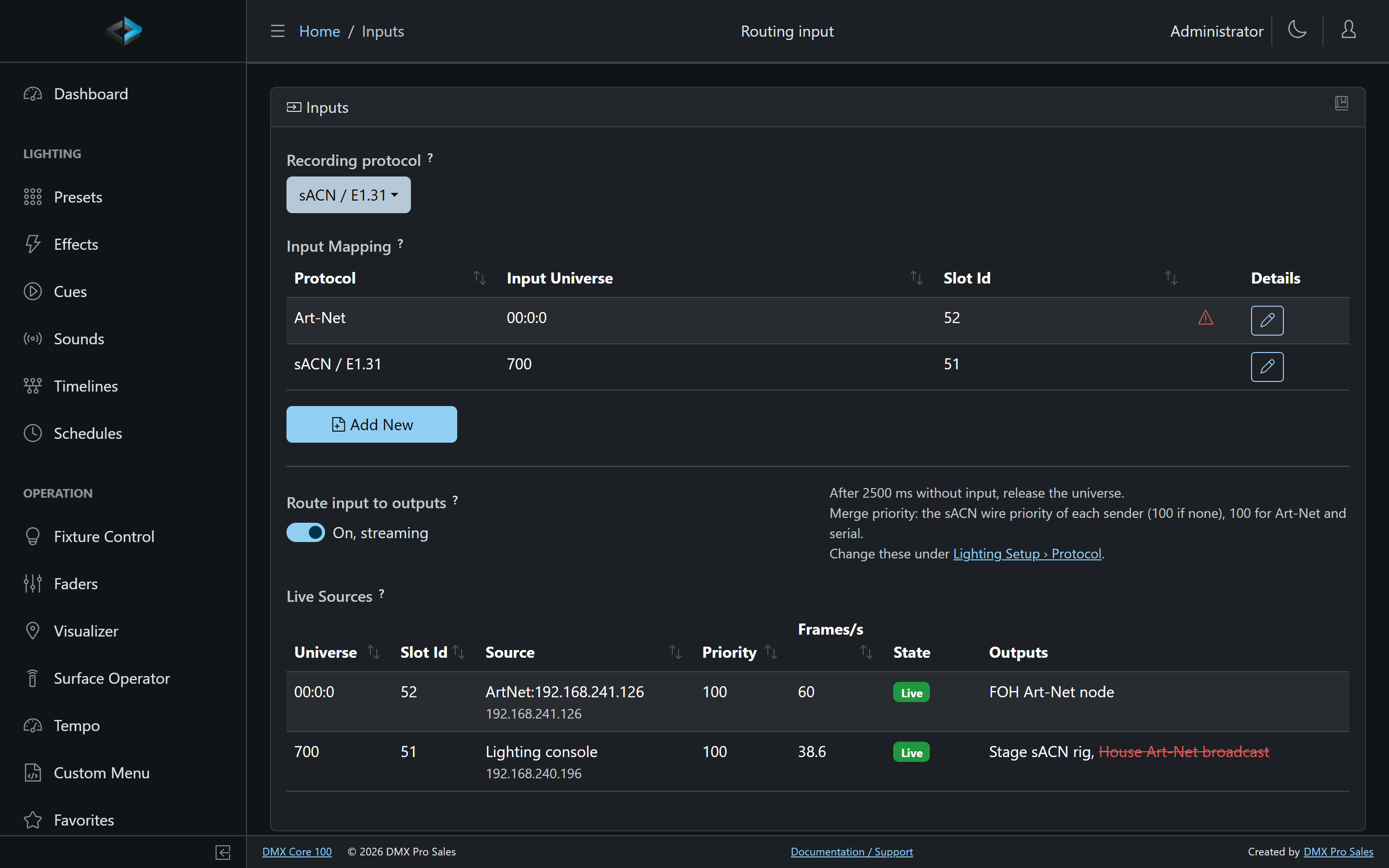
Input mapping. The device’s input table: which received universes to accept, on which protocol, and which slot id each lands on. Every row names its own protocol - sACN / E1.31, Art-Net or DMX Serial - and every protocol that has a row is listened to, so a console on sACN and one on Art-Net are routed at the same time. An output mapped to a row’s slot id receives the routed data. Universes that are not mapped are ignored.
Click Add New on Lighting Setup > Inputs to add a row, then open Details to edit it. The row editor has Save and Save & Go Back.
Art-Net universe numbers start at 0 (the field help says “Art-Net counts from 0”). sACN universes start at 1. The UI formats Art-Net as net:subnet:universe by subtracting 1, so a typed 1 displays as 00:0:0.
-
Recording protocol. A recording still captures one protocol; this picks which of the mapped ones. With a single mapped protocol there is nothing to choose and the page just names it. See Recording.
-
Route input to outputs. The switch. Configuring input alone never drives the outputs; only this switch does, so a device that has input mappings for recording does not start driving its lights from a console after an upgrade.
Slot ranges have to be disjoint between protocols: sACN universe 1 and Art-Net universe 0 cannot both land on slot 1, because the merge and a recording both key on the slot id and the two consoles would be interleaved into one universe. Two universes of the same protocol may share a slot; they merge highest-takes-precedence as sACN receivers do. Saving an overlapping mapping shows: Slot {n} is already mapped from {protocol} {universe}. Input rows on different protocols must use different slot ids.
A DMX Serial row’s “universe” is the board’s port number: 1 is port A, 2 is port B. Serial rows sit in the same table as network rows, so a console on DMX-512 port A and one on sACN route side by side.
The Live Sources table on the same page shows every sender seen on the mapped universes: its name and address, the universe and slot id, the priority it sends at, frames per second, whether it is live or has gone stale, and the outputs it reaches. An output shown struck through is not routed because of a conflict.
Routing is saved, and resumes on its own after a restart.
The DMX Core 100 ignores its own output when it comes back in on an input universe, so a routed universe never feeds itself. For sACN it recognizes itself by its sender id, so lighting software running on the same computer as the desktop software is routed normally. Art-Net carries no sender id, only the address, so Art-Net sent from the same computer as the desktop software is taken for the DMX Core 100’s own output and ignored: send sACN from software on the same machine, or run the console on another device.
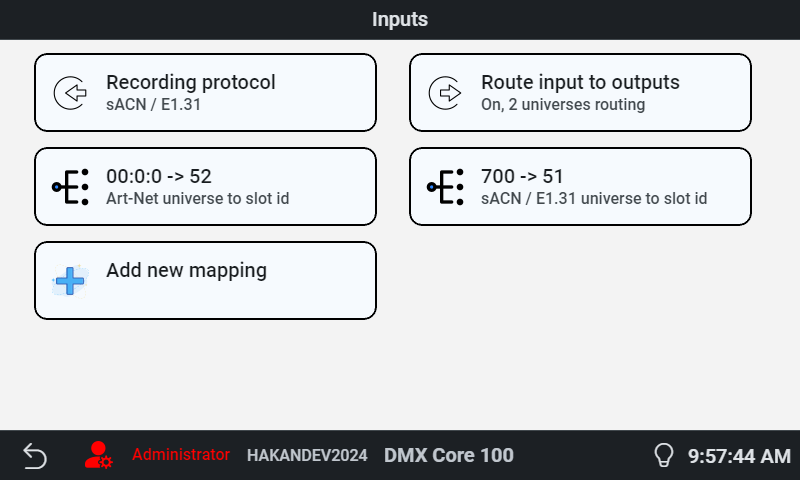
On the touchscreen, Main Menu › Settings › Inputs has the mapping (each row showing its protocol), the recording protocol, and the routing switch with a live status line.
Settings
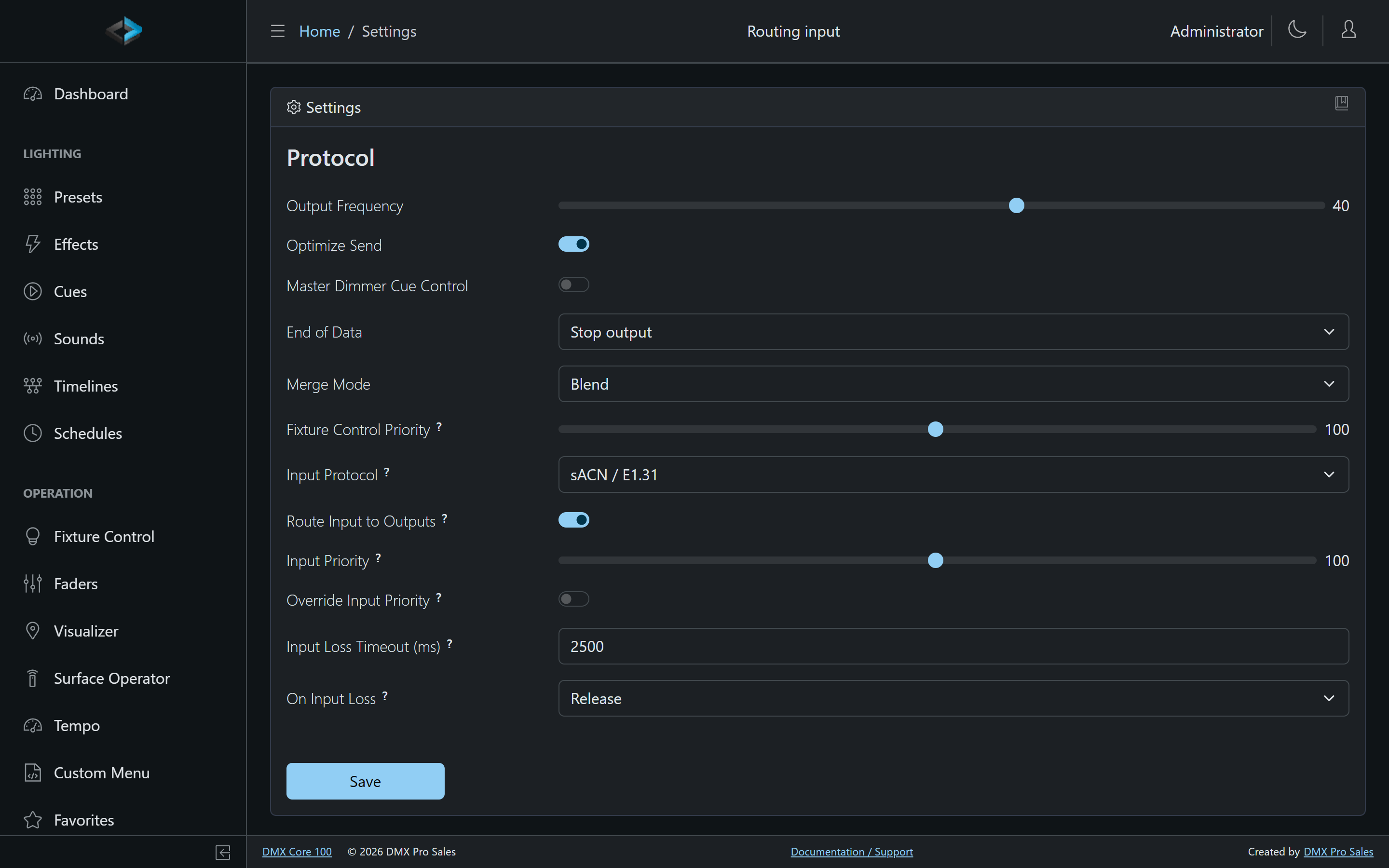
The finer settings are under Lighting Setup › Protocol:
| Setting | Meaning |
|---|---|
| Input Priority | Merge priority (1–200) for routed input from protocols that carry no priority of their own, Art-Net and DMX Serial. The default is 100, the same as a cue’s default, so routed Art-Net or DMX Serial blends with cues out of the box. sACN input uses the priority each sender transmits. With several protocols routed at once, each follows its own rule. |
| Override Input Priority | Use Input Priority for all routed input, ignoring what sACN senders transmit. |
| Input Loss Timeout (ms) | How long a routed universe may go without a packet before its source counts as lost. The default 2500 ms is the E1.31 value. |
| On Input Loss | What happens then. Release: stop sending the universe, so a cue or preset underneath takes back over and otherwise the End of Data applies. Hold last: keep sending the last received frame. Blackout and release: send zeros once, then release. |
Merging with playback
Routed input is one more source in the same priority merge that cues, presets and fixture control use. A console sending sACN at priority 200 takes over a universe that a cue plays at 100; at 50 the cue wins; at equal priority the two combine using the Merge Mode setting. Two consoles on the same universe merge highest-takes-precedence, as sACN receivers are expected to do.
The master dimmer applies to routed input like it does to fixtures, so pulling the house master to zero darkens the bulbs a console drives as well.
Stop, Blackout and Output Off
Routed input is an external source, not something the DMX Core 100 is playing, so the stop states treat it as such:
| State | Routed input |
|---|---|
| Stop | Keeps streaming. Stop ends the DMX Core 100’s own playback; the console’s universes carry on. |
| Blackout | Masked to zero like everything else, and comes back when Blackout is switched off. A live console cannot fill the output while Blackout is on. |
| Output Off | Parked: nothing is sent, but the device keeps listening so the Inputs page still shows the sources. Output On resumes routing at once. |
While a recording is being made, routing keeps running, which is exactly what you want when recording a show that the DMX Core 100 is itself routing. It is parked only while the recorder plays back a take for review, so that the live feed does not merge into what you are checking.
Loops and conflicts
A routed universe must not be sent back onto the same protocol and universe the DMX Core 100 receives it on, or the signal loops. The DMX Core 100 checks every output for this and skips the ones that would loop:
- sACN multicast, or Art-Net broadcast, on a universe that is an input universe.
- Unicast to one of the DMX Core 100’s own addresses on an input universe.
- The DMX-512 port that is the input, or the destination port of the firmware Passthrough.
With more than one protocol mapped the same rule catches loops that cross protocols: an output sending a slot on Art-Net universe 0 is not routed if Art-Net universe 0 is itself an input row, whichever protocol feeds that slot. The Inputs page marks a mapping row with a warning triangle when an output sends to it, naming the outputs that are left out of routing because of it.
Such an output shows Routing Conflict in the Outputs list, with a ? that explains why. It still works for normal playback; it is only left out of routing.
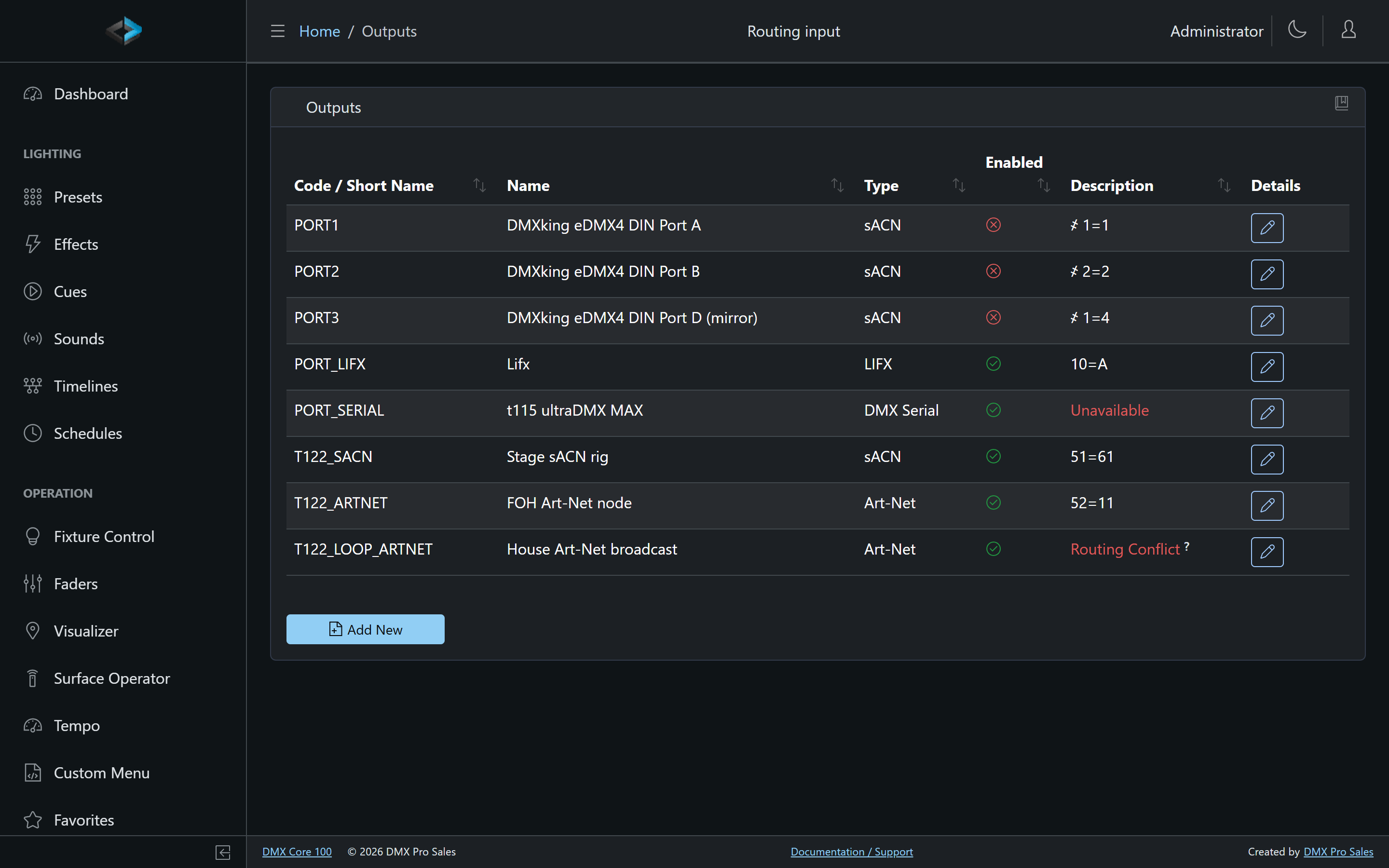 Unicasting the same universe to a specific node’s IP address, or sending on a different universe, is fine. A universe received on Art-Net universe 0 and sent as Art-Net broadcast on universe 1, for example, routes normally.
A mapping that closes a loop through a second input row - slot 1 out on Art-Net universe 0, Art-Net universe 0 in to slot 2, slot 2 out on sACN universe 1, sACN universe 1 in to slot 1 - is refused when you save it, because every output on that path would be left out of routing and nothing could reach the wire. Sending a universe you also listen on straight to one node’s IP address is not a loop and stays allowed.
Zone-scoped outputs are not fed by routing; routed data goes to the outputs mapped for all zones.
Moving a port pair from firmware passthrough to stream routing
Firmware passthrough is port-to-port only and does not merge. To merge a DMX-512 board input with cues, or to fan it out to network and plugin outputs:
- Set Passthru function to None (Lighting Setup > Protocol, or touchscreen Settings > System Settings under the Protocol header).
- On Lighting Setup > Inputs, Add New and create a DMX Serial row for the input port (universe 1 = port A, 2 = port B) onto the slot you want.
- Add or keep an output on port B (or A) at the same slot.
- Turn on Route input to outputs.