
Color Palettes
A color palette is a named, ordered set of colors, such as Sunset (deep red, orange, amber, pink) or Ocean (blues and teals). Instead of typing the same colors into every effect and preset, point them at a palette: change the palette and everything that uses it changes with it. Music Mode also walks through groups of palettes as the music changes.
Palettes are managed under Lighting > Color Palettes in the Web UI.
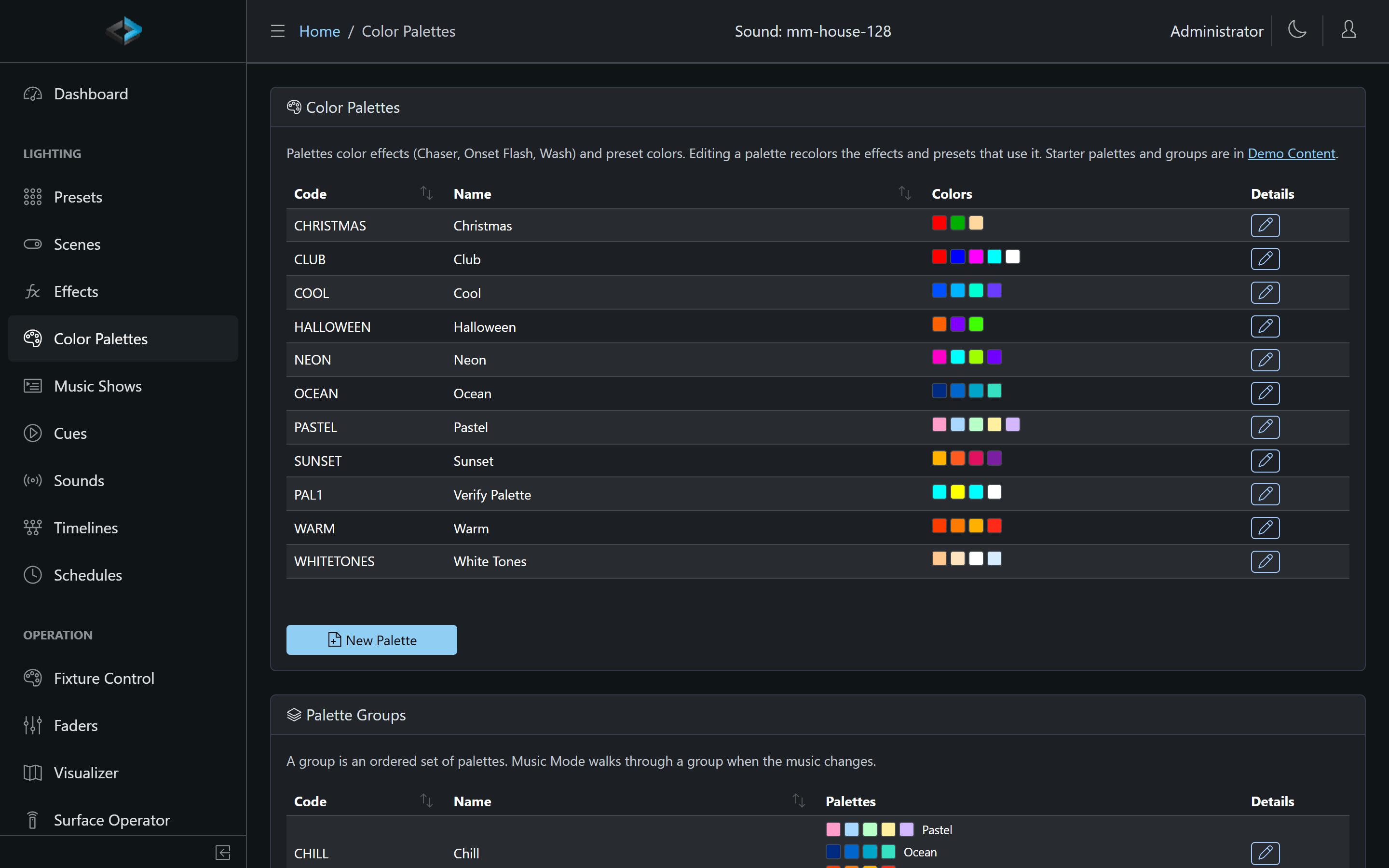
Getting the Starter Palettes
A new unit has no palettes. Ten ready-made palettes (Warm, Cool, Pastel, Sunset, Ocean, Neon, Club, Christmas, Halloween, White Tones) and three groups (Party, Chill, Lounge) come with the software as demo data: on the Color Palettes page follow the link to the demo content, or go to Backup & Restore > Create Demo Data and filter by Color Palette. Importing a group brings its palettes along. A palette whose name already exists is reused rather than duplicated.
Imported palettes and groups are ordinary ones: edit, duplicate or delete them like your own.
Editing a Palette
- Code and Name.
- Colors: at least two, in order. Each is a color picker. Turn on White, Amber and UV to give a color an amount of white, amber or UV for fixtures that have those channels; a fixture without them uses the RGB part only.
- Move colors up and down, remove them, or Add Color.
- Complementary, Analogous and Triadic add colors derived from the selected color (or the last one): the opposite hue, the two neighbors 30 degrees either side, or the two hues a third of the way round. They keep its saturation and brightness.
Saving a palette recolors what uses it, live: running effects that use it are rebuilt with the new colors, and active presets with colors linked to it fade to the new colors.
Using a Palette
In an effect. The generators that take a color list (Chaser, Onset Flash, Wash) have a Palette select above their colors. With a palette chosen, the effect uses the palette’s colors and the preview shows them; the effect’s own color list is hidden but kept, and is used again if the palette is removed or deleted. See Effects.
In a preset color. In the preset editor’s color dialog, the From Palette card shows the palettes and their colors. Click a color to set the fixture entry to it and link the entry to that palette color: when the palette changes, the preset takes the new color the next time it is applied, and an active preset is recolored at once. Moving the color wheel or pasting a color makes the entry a plain color again. See Presets.
In Music Mode. A Music Show look can use a palette, or From the group for the show’s palette group.
Palette Groups
A palette group is an ordered list of palettes that belong together, for example Party: Neon, Club, Sunset, Cool. Groups are for Music Mode: a Music Show with a palette group moves to the group’s next palette at each section change of the song, so the colors change when the music does. Create a group on the Color Palettes page and pick its palettes in order.
Deleting and Renaming
- Deleting a palette leaves its users on their own colors: effects go back to their own color list, and presets keep the colors they had when the link was last edited.
- A group whose palette was deleted shows the missing member and skips it.
- Changing a palette’s code is the same as deleting it for the effects and presets that used the old code.
Notes
- Palettes are stored on the unit and included in backups.
- The touchscreen shows preset and effect colors as stored; palettes are edited in the Web UI.
- An ambient preset linked to a palette takes a palette change the next time it is applied, not live.