
Timecode Chase
Timecode chase locks a timeline to incoming Art-Net ArtTimeCode so the playhead follows a site-wide clock instead of starting at the cursor. Play joins wherever that clock is now - three minutes into a show after a reboot, or at the same frame as every other controller on the network.
Typical setup: QLab, TimeCore, Timecode Expert, or another ArtTimeCode generator puts one clock on the LAN. Each DMX Core 100 runs its own zone timeline and chases that clock.
This is a playhead chase, not a per-cue timecode trigger. Cues, presets, and sounds on the timeline still fire by their timeline times; the clock only decides where the playhead is. A join that lands inside a cue or sound starts it part-way through (a soundtrack picks up mid-file); events that were already over before the join point are skipped.
The settings use the same vocabulary as grandMA3’s timecode shows and slots - Internal, Offset, After Roll, Auto Start, Auto Stop - so an operator coming from a console should find them familiar.
See Timelines for the editor itself.
What You Need
- An Art-Net ArtTimeCode source (
OpTimeCode0x9700) on UDP port 6454 - the same port as Art-Net lighting. - Packets sent to the device’s Ethernet address (unicast) or the subnet broadcast. Sending to
127.0.0.1on a PC will not reach a unit that is bound to its LAN adapter. - A timeline whose duration covers the portion of the clock you want to chase.
The device listens for ArtTimeCode as soon as network lighting output is up. You do not need a dedicated Art-Net input or a special output mapping.
This release receives ArtTimeCode only. MIDI timecode (MTC) and LTC (audio timecode) are not supported. The device does not generate ArtTimeCode.
QLab can generate timecode, but not Art-Net ArtTimeCode by itself - use a converter, Visual Productions TimeCore, Timecode Expert, or another ArtTimeCode generator.
The TC Readout
The timeline editor status bar has a TC: chip:
- waiting… - no live ArtTimeCode on this network (or it went silent).
HH:MM:SS:FFplus fps and source IP - packets are arriving.
Confirm this chip before opening day. The timeline does not have to be in a timecode mode for the readout to work.
Timecode Mode
Open the timeline editor, expand timeline settings (the More… pill next to the name), and pick a mode in the Timecode section. Internal is the default. The settings below appear for either timecode mode.
| Mode | Meaning |
|---|---|
| Internal | The timeline runs on its own clock and ignores incoming timecode. Play starts at the cursor. |
| Chase | Play joins live timecode when it is in range. Without timecode, the timeline runs on its own clock from the cursor, so an operator can still preview or run it by hand. |
| Timecode only | Only the clock can drive the timeline. Play, Jump, and Resume are refused unless they join live timecode in range. See Timecode only. |
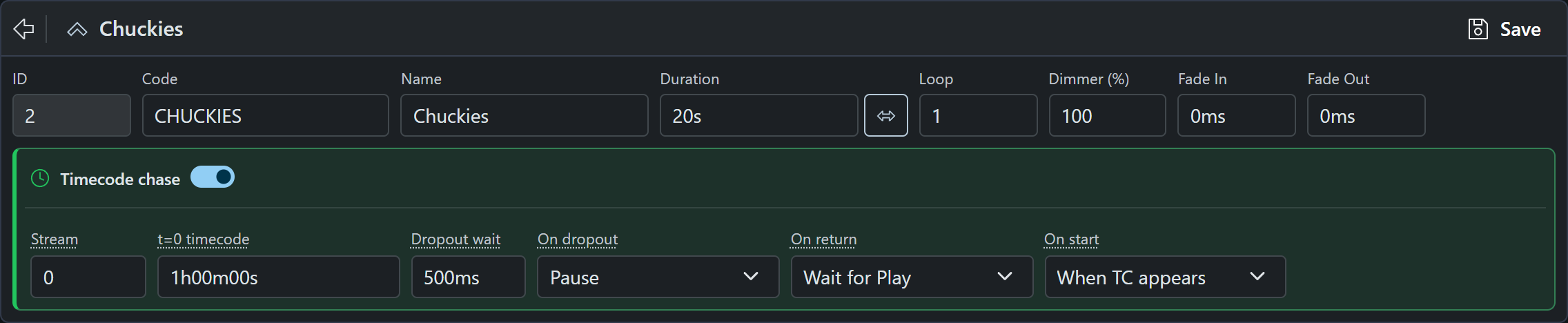
| Setting | Meaning |
|---|---|
| Art-Net stream | Art-Net timecode stream 0–255. Must match the generator (often 0). |
| Offset | The incoming timecode at the start of this timeline (timeline 00:00). Default is 1 hour (01:00:00:00 / 1h00m00s). |
| After Roll | How long the timeline keeps running on its own clock after the signal stops or freezes on the same frame, before Auto Stop applies. Default 500 ms, minimum 100 ms. |
| Auto Stop | What happens when the After Roll runs out: Off, pause, Off, keep running, or On, stop. |
| Auto Resume | When timecode comes back after the After Roll: On follows it again, Off waits for Play. Hidden when Auto Stop is On, stop (that mode always waits for Play or Auto Start). |
| Auto Start | On starts the timeline by itself when valid timecode is in range; Off waits for Play. |
Save the timeline after changing these. Suggested settings when you first turn timecode on: mode Chase, Art-Net stream 0, Offset 1 hour, After Roll 500 ms, Auto Stop Off, pause, Auto Resume On, Auto Start Off.
Offset and range
Timeline position is incoming timecode minus Offset. With the Offset at 01:00:00:00, a packet of 01:00:08:00 is 8 seconds into the timeline.
- Before the Offset is out of range: Auto Start does not start yet; Play starts at the beginning of the timeline and then catches the clock when it reaches the Offset. In the last second before the Offset the timeline is loaded in advance (a lead-in) so the start is frame-accurate.
- Past the timeline duration is also out of range: no auto start. If the timeline is already playing, it ends (or follows Auto Stop) as usual.
Frame rate follows the packet (24, 25, 29.97 drop-frame, or 30 fps). There is no separate fps setting.
How Play Joins
When the timeline is in a timecode mode and live timecode is in range (matching Art-Net stream):
- Play - from the Web UI, touchscreen, a schedule, a custom menu, OSC, the API, or a script - joins the live clock. It does not start at the editor cursor.
- Jump / scrub Play in the editor does the same: set the mode to Internal if you need to preview from the cursor.
- Loop is treated as 1 while chasing. A non-looping site clock should not wrap a looping timeline.
A mid-show join takes about one second: the timeline is loaded one second ahead of the clock and started the moment the clock gets there, so the playhead lands within a few milliseconds of timecode instead of a load time behind it. Expect that short delay after pressing Play.
To preview or run the timeline on its own clock, set Timecode to Internal. In Chase mode a Play with no live timecode also runs the timeline on its own clock from the cursor; in Timecode only it is refused.
Timecode Only
Use Timecode only when the timeline must never run off the clock - a show that has to stay in sync with the site’s audio or video, where a stray Play from a touchscreen, a schedule, or a control surface would run the lights out of sync. This is how a grandMA3 timecode show assigned to a TC Slot behaves.
- Play, Jump, and Resume are accepted only when they join live timecode in range. Otherwise they are refused, from every source: the timeline editor, the Timelines page, the touchscreen, custom menus, control surfaces, input triggers, schedules, OSC, and the API. The Web UI shows the reason (for example “Timeline SHOW is timecode only and no timecode is being received on stream 0”); schedules and triggers log a warning and skip the action.
- Stop and Pause still work. Stop stays the emergency override. A stopped timeline re-arms for the next pass of the clock exactly as in Chase mode; while the clock is still live and in range, Play or Resume rejoins it.
- Auto Start still applies. On starts the timeline by itself; Off needs a Play while timecode is live and in range.
- After Roll and Auto Stop are unchanged. Off, keep running still lets the timeline run on its own clock after the signal is lost, if that is what you chose.
The editor header shows a TC only chip for such a timeline, and the settings panel turns amber with a lock icon.
While Locked
- Locates and restarts on the generator are followed. If the clock jumps forward by more than a second, or backwards at all (a stop and restart at the top, for example), the timeline re-seeks to the new position. Small drift is not corrected: once locked, the timeline runs on its own clock until the next signal loss, jump, or Play.
- A rewind to before the Offset stops the timeline. The clock says the show has not started; the timeline re-arms for the start and starts again when the clock gets there (Auto Start On) or waits for Play.
- Stop and Pause are yours. Stopping or pausing a chased timeline (from the Web UI, touchscreen, or any trigger) sticks: it does not restart by itself while the same pass of the clock is running, even with Auto Start On. Play rejoins the live clock; Resume on a paused timeline also rejoins live timecode rather than continuing from where it was paused.
- A new show clears that. When the clock rewinds or leaves the timeline’s range, a stopped or paused timeline is ready to start again by itself (Auto Start On), or waits for Play (Auto Start Off).
Auto Start
| Choice | Behavior |
|---|---|
| Off (default) | The timeline stays idle until Play (or another trigger). Then it joins live timecode if it is in range. |
| On | As soon as valid timecode is in range, the timeline starts by itself - including after a device restart, as long as the clock is still in range. |
Use On when the site clock is the master and you want every Core to catch the show without someone pressing Play. Use Off when an operator or schedule should still choose to join.
After Roll, Auto Stop, and Auto Resume
The signal is lost when packets stop or the same frame repeats (a hold on the generator). Both count. For the length of the After Roll the timeline keeps running on its own clock; if the signal comes back in time, nothing happens. When the After Roll runs out, Auto Stop applies.
| Auto Stop | What happens |
|---|---|
| Off, pause | Hold the last look. The playhead freezes. |
| Off, keep running | Keep running on this timeline’s own clock, indefinitely. |
| On, stop | Stop the timeline. The next Play joins live timecode again; timecode returning on its own is ignored for the rest of this pass. Auto Resume is not used. When the clock rewinds for the next show, Auto Start On starts the timeline again without a Play. |
When timecode comes back (Off, pause or Off, keep running):
| Auto Resume | What happens |
|---|---|
| On | Re-lock to live timecode immediately. A paused timeline seeks to the current clock; a timeline that kept running re-locks in place if it is still within half a second of the clock and seeks only if it has drifted further. |
| Off | Stay paused or keep running. Play (or Resume, if the timeline is paused) joins the live clock when you are ready. With Auto Start On, the next show (clock rewinds or leaves range) stops the paused timeline and starts it again from the beginning by itself. |
Restart Mid-Show
Timecode settings are stored with the timeline. After a reboot, timelines in a timecode mode load again and the Art-Net listener re-attaches.
- Auto Start On - if the clock is still in range, the timeline starts at the live position, not the beginning.
- Auto Start Off - wait for Play; that Play still joins live timecode, not the start.
Holds
A Hold milestone leaves the clock while the timeline is holding. Incoming timecode is ignored until the hold is released, including generator restarts. After release, Auto Resume applies: On re-locks to live TC if it is in range; Off (or On, stop as the Auto Stop choice) stays uncoupled until Play.
Troubleshooting
| Symptom | Check |
|---|---|
| TC chip stays on waiting… | Generator destination is the device IP (or broadcast) on UDP 6454, not loopback. Device and generator are on the same subnet. Firewall is not blocking UDP 6454. |
| Play starts at the beginning instead of joining | Timecode mode is saved as Chase or Timecode only. Art-Net stream matches the generator. Live TC is in range (at or after the Offset, before the end). |
| Play is refused with a “timecode only” message | The timeline is Timecode only and there is no live timecode in range on its Art-Net stream. Wait for the clock (check the TC chip), or switch the mode to Chase to run it by hand. |
| One unit chases, another does not | Art-Net streams match. Each unit’s Offset and duration cover the same clock window. |
| Timeline stops when TC freezes | That is Off, pause or On, stop after the After Roll. Use Off, keep running if a frozen frame should not hold the look, or lengthen the After Roll. |
| Timeline never starts by itself | Auto Start is Off (the default) - press Play. Or TC is still before the Offset / past the end. Or the timeline was stopped or paused during this pass of the clock: press Play, or let the clock rewind for the next show. |
| Timeline starts about a second after Play | Expected: a mid-show join is loaded one second ahead so it lands on the clock. |
| Playhead is a few frames off after a restart | Check the generator’s frame-rate flag matches its actual rate; the timeline follows the packet’s rate. |