
Internet Passthrough
Internet Passthrough gives a DMX Core 100 temporary internet access through a computer on the same network - useful when the unit is installed on an isolated network with no internet of its own (for example, a school or venue network), but you occasionally need to get it online to install software or Host OS updates.
You run a small companion app, DMX Core Connect, on a computer that is on the same network as the DMX Core and has its own internet connection (such as a laptop on Wi-Fi). While it is active, all of the DMX Core’s internet traffic is routed through that computer.
How It Works
The computer acts as a temporary gateway to the internet:
- The computer connects to the DMX Core’s (isolated) network, usually by Ethernet.
- The same computer also has internet access - commonly Wi-Fi, including networks that require a login.
- DMX Core Connect shares that internet connection, and the DMX Core routes its traffic through it.
This covers all of the DMX Core’s traffic, including software updates, Host OS updates, and the cloud connection - not just the app.
What You Need
- A Windows or Mac computer that can be on the same network as the DMX Core (usually by Ethernet) and has internet access (for example, Wi-Fi).
- The DMX Core Connect app, available from the downloads page. It is signed and updates itself automatically.
Using It
The Internet Passthrough section is hidden by default to keep the Utilities > System page uncluttered. To show it, go to Device > Network in the Web UI, follow the network settings link at the bottom of the page, and turn on Enable Internet Passthrough. This only needs to be done once.
- Connect the computer to the same network as the DMX Core (usually by Ethernet), and make sure it also has internet access.
- Install and run DMX Core Connect on the computer.
- In the DMX Core Web UI, go to Utilities > System and find the Internet Passthrough section.
- Pick your computer from the list of discovered computers and select Activate. (If your computer isn’t listed, enter its IP address manually - DMX Core Connect shows the computer’s addresses in its window.)
- Wait for the status to show green: Internet access and Cloud connection confirm the DMX Core is online. You can now install software updates as usual.
- When you’re finished, select Deactivate.
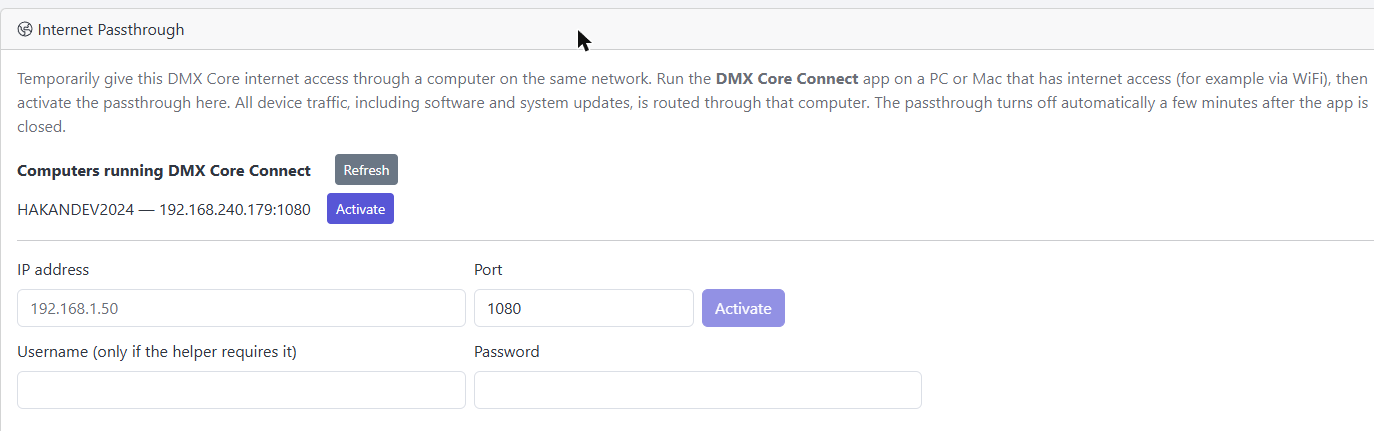
Advanced: Use a Standard Proxy Instead
The DMX Core routes through any standard SOCKS5 proxy, so DMX Core Connect is optional. For example, with gost (free), run this on the computer:
gost -L socks5://:1080Then enter that computer’s IP address and port 1080 manually in the Internet Passthrough section on Utilities > System.