Music Shows
A Music Show is a style for Music Mode: it says what each zone does while music plays. Chill might give every zone slow, breathing washes; Party might put chases on the bars, flashes on the dance floor and lasers on the kick. Music Shows are listed under Lighting > Music Shows in the Web UI; the running one has a RUNNING badge.
Create starter styles from my zones makes Chill, Dance and Party from your zones, plus the six music effects their looks use (codes starting with MM_). Styles and effects whose code already exists are left as they are, so pressing it again only adds back what you deleted. Use the starters as they are, or duplicate one and change it.
Show Settings
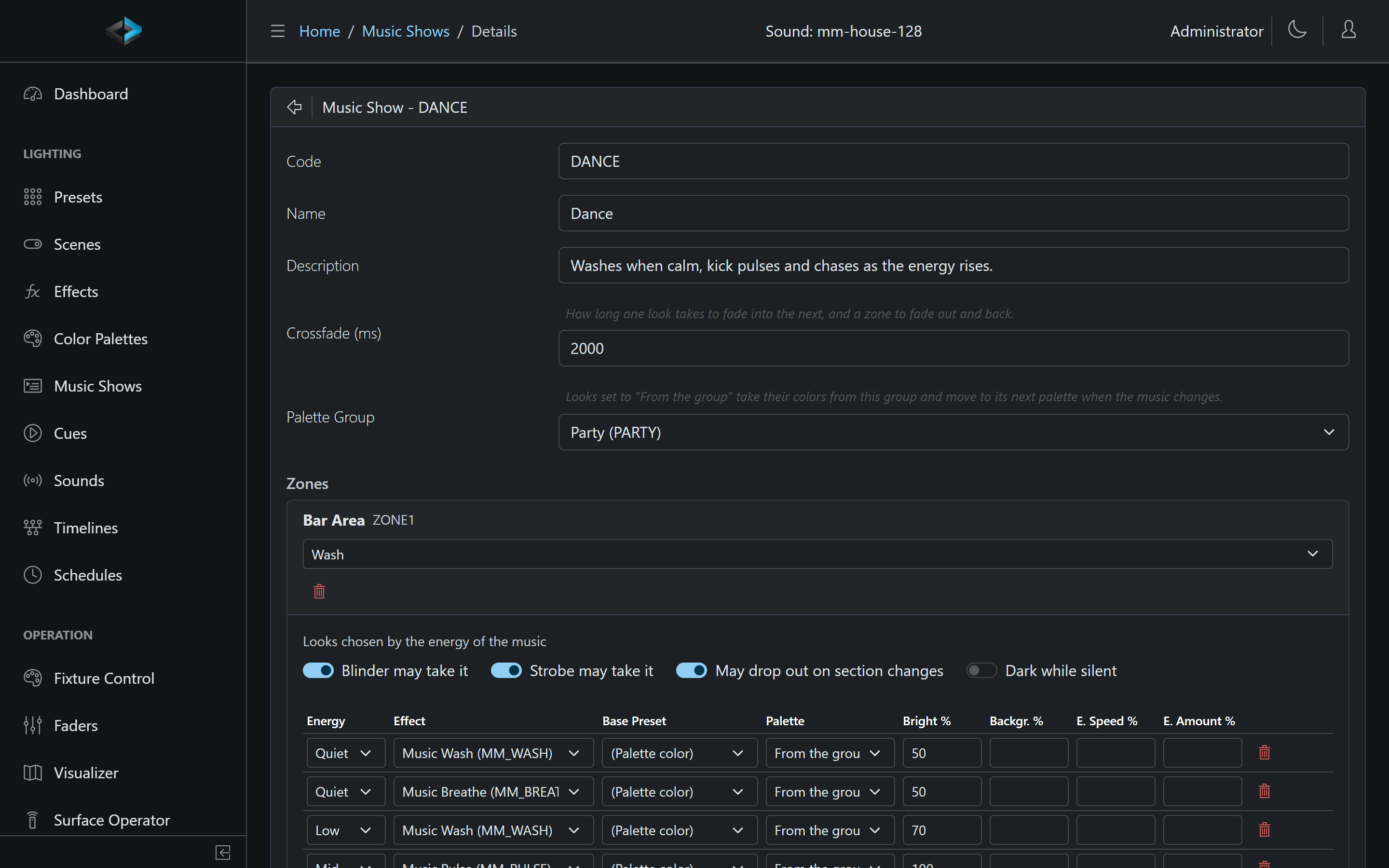
- Code, Name, Description: the name is what the style tiles show; the description is shown on the touchscreen tile.
- Crossfade (ms): how long a change of look takes (default 2000 ms, up to 30 seconds).
- Palette Group: a palette group that walks one palette on at each section change. Looks set to From the group use the group’s current palette.
- Brightness, Excitement and Background: the style sliders, also on the Music Mode page and the touchscreen. Brightness (0 to 100%) dims every wash look on top of its own brightness; Excitement (-1 to +1) makes every look calmer (about half the speed and energy response at -1) or wilder (about double at +1), 0 plays the looks as built; Background (0 to 0.3) is the least light under every wash look’s effect. A new style starts at 100%, 0 and 0. See Style Sliders.
Zones and Roles
Add the zones Music Mode should drive with Add Zone, and give each a role:
| Role | What Music Mode does |
|---|---|
| Wash | Looks chosen by the energy of the music |
| Effect | Presets for music states (lasers, derbys, multi-effect fixtures) |
| Mover | Position presets that move on section changes |
| Static | Left alone by Music Mode |
Each zone also has:
- Blinder may take it and Strobe may take it: whether the Blinder and Strobe take this zone while the style runs (never for a static zone).
- May drop out on section changes (wash zones): see Dropouts.
- Dark while silent: the zone fades out when the music stops and comes back when it starts. Without it, the zone holds its quiet look through the silence.
A zone keeps the settings of the roles it does not use, so switching a zone’s role back brings its looks back.
Wash Zones: Looks
A wash zone has a table of looks, sorted by Energy (Quiet, Low, Mid, High, Peak). Music Mode shows a look of the current energy. When the current energy has no looks, it uses the nearest energy that has them (the lower one on a tie), so a zone with only a Quiet and a Peak look still works. Several looks of the same energy take turns when the music changes section.
A look is made of:
- Effect: the effect to run, or (None, static) for a still color.
- Base Preset: the color and intensity under the effect, taken from a preset’s entry for each fixture (or its zone or global entry). (Palette color) uses the first color of the look’s palette, or white without one.
- Palette: the colors of the effect: (Effect’s own), a named palette, or From the group, which follows the show’s palette group.
- Bright %: the intensity of the look.
- Backgr. %, E. Speed %, E. Amount %: override the effect’s Background, Energy to Speed and Energy to Amount for this look (see Music settings). Leave them blank to keep the effect’s own.
Rules that keep a room from flapping:
- A look stays at least 8 seconds. When the energy changes sooner, the zone waits.
- A section change lets each zone move on to its next look, but never forces it: a zone still inside its 8 seconds keeps its look.
- A section change walks the palette group one palette on. Looks set to From the group take the new palette the next time they change, and a zone whose only look is From the group is re-colored at once.
Effect Zones: Presets by Music State
For lasers, derbys and fixtures with their own built-in programs, an effect zone runs a preset for the moment of the music. Each entry is a state (Any state but silence, Quiet (no kick), Kick active, or Silence), an energy (Any energy or one of the five), and a preset or (Off).
- The most specific entries for the moment win: an entry with both a state and an energy beats one with only one of them, which beats one with neither.
- Several entries that match equally take turns on section changes.
- No matching entry, or an (Off) entry, leaves the zone dark.
- A change waits at least 4 seconds, shorter than a wash look, so “lasers while the kick plays” follows the kick.
Example: Kick active / High: Laser 1, Kick active / Peak: Laser 2, Any state but silence / Quiet: (Off).
Mover Zones: Positions
Until moving heads get their own music movement, a mover zone steps through a list of position presets: one step per section change, holding each position at least as long as Hold each position at least (16 seconds by default; the Chill starter uses 30). Order the positions with the arrows.
Dropouts
On some section changes (about one in three), one wash zone with May drop out on section changes fades dark, so the rig never flashes as one block. It comes back at the next section change, or after 16 seconds at most. Dropouts only happen while at least two wash zones are lit, never take the zone that just came back, and never the same zone twice in a row. The Dance and Party starters allow dropouts when you have two or more wash zones.
Warnings
The editor warns about zones Music Mode would leave alone, instead of failing:
- a zone that does not exist (marked MISSING; a deleted and re-created zone with the same code is picked up again),
- a wash zone without looks, an effect zone without presets, a mover zone without positions,
- looks From the group in a show without a palette group (they keep the effect’s own colors).
A zone of the show that has no enabled fixtures is left alone too, and shows NO FIXTURES on the Music Mode page.
Notes
- Editing the running show takes effect at once: Music Mode restarts it from the new definition and keeps each zone’s look where it can.
- Presets in effect and mover zones apply their colors, intensity and other values, not the preset’s own effects. A preset with no intensity is shown at full, and one without a color in white, so position-only and laser presets show.
- Music Shows need the same permissions as presets (edit, delete); anyone signed in can see them and run Music Mode.