
Installing the Firmware
The USB Interface firmware is free for every DMX Core Pico 2 owner, including Re-Mapper owners. It is a single .uf2 file. You can install it with the DMX Core USB Interface Utility, or copy it onto the board yourself. Both use the RP2040’s USB boot loader, which is in ROM and cannot be overwritten, so a failed or interrupted install can always be repeated.
With the DMX Core USB Interface Utility
-
Install the utility and start it.
-
Hold the BOOTSEL button on the Pico 2 (next to the USB-C connector, marked on the label) and plug it into the computer. The
RPI-RP2drive appears. -
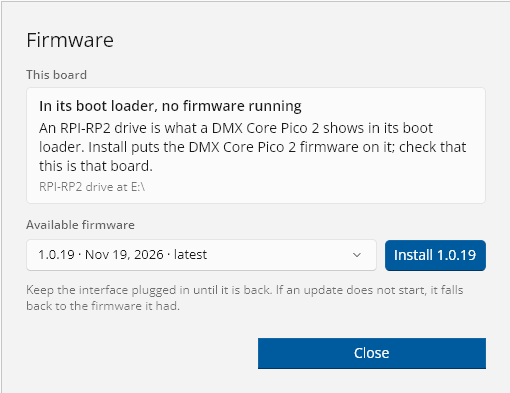
The utility shows A board is in its boot loader. Click Install firmware….

-
Pick a version (the latest is selected) and click Install. The utility downloads the firmware from GitHub, copies it to the board, and waits for the board to start it.
When it is done, the interface shows up in the utility’s main window.
By copying the file
- Download
dmxcore-pico2-usb-interface-<version>.uf2from GitHub releases. - Hold the BOOTSEL button (next to the USB-C connector) and plug the Pico 2 into the computer. A drive named
RPI-RP2appears. - Copy the
.uf2file onto the drive.
The board restarts with the new firmware. The drive disappears and a new serial port appears.
Updating
Once the USB Interface firmware is running, you don’t need the BOOTSEL button for updates:
- Open the USB Interface Utility and select the interface.
- Click Firmware…. The dialog shows the installed version and whether an update is available.
- Pick a version and click Install. The utility puts the interface into its boot loader, copies the firmware, and waits until the interface is back.
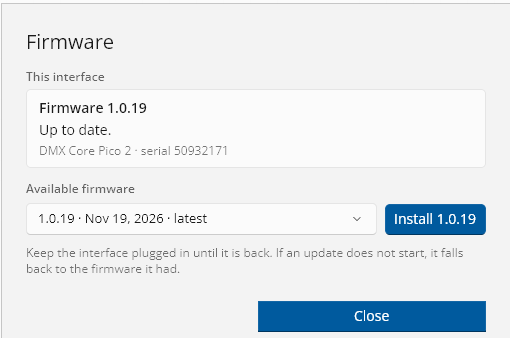
Keep the interface plugged in until it is back. Settings are kept across updates.
If the utility cannot find the boot drive after the interface restarts into its boot loader, it saves the .uf2 file to your Downloads folder and tells you to copy it onto the RPI-RP2 drive yourself.
You can also install an older version from the same list.
Going back to the Re-Mapper or your own firmware
Copy a different .uf2 the same way: hold BOOTSEL, plug in, and copy the file onto the RPI-RP2 drive.
- Re-Mapper: download
dmxcorepico2-remapper.uf2from the Re-Mapper releases. The USB Interface firmware does not touch the part of the flash where the Re-Mapper keeps its mapping and license, so they are still there when you go back. The license is tied to the board, so if it is ever lost, the Re-Mapper can be activated again. To keep a copy of your mapping, use Write Mapping to local file in the Re-Mapper Config Utility before you switch. - Your own firmware: see the Pico 2 Software page.
Release notes
Each release on GitHub lists what is new. The utility’s Firmware dialog shows the same notes for the selected version.
© 2026 DMX Pro Sales, LLC. All rights reserved. DMX Core is a registered trademark of DMX Pro Sales, LLC. Other product names are trademarks of their respective owners.