
OSC – Open Sound Control
The DMX Core 100 speaks OSC (Open Sound Control), so applications like TouchOSC, QLab, lighting consoles, and media servers can trigger playback and control levels over the network - with live status fed back to the controller.
Prefer to watch? The video above controls lights from TouchOSC: cues, presets and live feedback.
Server Settings
The OSC server listens on UDP port 8000 by default. The port is configurable under Device > System > OSC Port in the Web UI (requires a restart). No other setup is needed - the built-in addresses below work as soon as the device is on the network.
Three Ways to Use Incoming OSC
- Built-in addresses - a fixed set of
/dmxcore/...addresses that play cues, timelines and sounds, apply presets, start effects, and set levels by code. Nothing to configure: send/dmxcore/cue/ACT1and the cue with codeACT1plays. See the reference below. This is the right fit for a show controller or playback software that just needs to fire saved cues. - Input triggers - for your own address space, or for actions the built-in set doesn’t cover (scripts, output events, toggling output, playback options such as a start position), define an input trigger of type OSC with the address of your choice. A Value-mode trigger feeds a fader’s value straight into a level.
- OSC control surfaces - bind a whole OSC layout (TouchOSC, a console’s OSC page) to a control surface for structured, bank-switchable panels with full two-way feedback, including Absolute/Relative slider modes and press-and-hold auto-repeat. The surface binds to a named OSC client, so it is the right fit for a dedicated operator panel rather than one-off cue triggers.
Built-in addresses and input triggers work at the same time: a message that matches an input trigger and a built-in address does both. A control surface, on the other hand, owns its sender: once an OSC client with a specific source IP is bound to an enabled surface, every message from that IP goes to the surface and neither the built-in addresses nor input triggers see it. A surface bound to an any-source client only claims the addresses it has assignments for and lets everything else through.
Plugins add a fourth path: a plugin can subscribe to an address pattern (for example everything under /myplugin/) and reply to the sender from the device’s OSC port. Plugin subscriptions sit between control surfaces and the paths above - a message a control surface owns never reaches a plugin, and a message a plugin matches is not passed on to input triggers. The /dmxcore/... addresses are reserved: a plugin can observe them, but the device always handles them itself. See Building & Publishing Plugins if you want to write one.
Playing a Cue
The most common use is firing saved cues from a show controller. The address is the cue’s Code / Short Name as entered on the cue’s details page:
/dmxcore/cue/ACT1Send it with no argument, or with a button’s 1, to play the cue normally; a 0 (the button’s release) is ignored. Codes must match exactly as entered, including upper/lower case. For a step-by-step walkthrough and troubleshooting, see Play a Cue over OSC. To stop playback:
/dmxcore/cuecontrol/stopBuilt-in Address Reference
Keywords in the address (cue, dimmer, master, …) are matched case-insensitively. A <code> is the entity’s code from the Web UI and must match exactly.
The argument follows one rule, the same one QLab, ETC Eos and Resolume use, so a button in TouchOSC, Companion or a console works with its default settings:
- A trigger address (play, stop, start, toggle, step) reads its argument as a press: no argument or any non-zero number fires it, and
0is the button’s release and is ignored. A TouchOSC button that sends1on press and0on release therefore fires once per press. For a sender that receives feedback (see OSC Clients and Feedback), a release also makes the device send that item’s state back on the same address (/dmxcore/preset/BAR_RED 1while the preset is applied), so the button’s light recovers without a script. A sender with no feedback gets nothing back, since it would never hear when the item ends. - A level address reads its argument as the value: one number, required. Levels are
0.0–1.0, times are milliseconds. - An option such as a fade time or a loop count has a sub-address of its own (
/dmxcore/preset/<code>/fade 2000), so a button’s1can never be mistaken for it.
A float, integer, numeric string or OSC True/False is accepted anywhere a number is.
Playback
| Address | Argument | Action |
|---|---|---|
/dmxcore/cue/<code> | press | Play the cue with its own loop count from the Cues page. |
/dmxcore/cue/<code>/loop | loop count | Play the cue and loop it that many times instead. |
/dmxcore/cuecontrol/stop | press | Stop cue playback. |
/dmxcore/timeline/<code> | press | Play the timeline. |
/dmxcore/sound/<code> | press | Play the sound. |
/dmxcore/preset/<code> | press | Fade to the preset over the default fade duration. |
/dmxcore/preset/<code>/fade | fade time in ms | Fade to the preset over the given time; 0 snaps. |
/dmxcore/effect/<code> | press | Start the stored effect as the global effect, with its saved parameters and colors. |
/dmxcore/effect/none | press | Clear the global effect. |
Levels
| Address | Argument | Action |
|---|---|---|
/dmxcore/dimmer/master | level | Set the master dimmer. |
/dmxcore/dimmer/master/fadeto | level, fade time in ms | Fade the master dimmer to a level over the given time (two arguments). |
/dmxcore/dimmer/zone/<code> | level | Set a zone’s intensity. |
/dmxcore/control/<code> | level, or 1 / 0 | Set a Control Value with no trigger or control surface configured: a Level takes the number as its level, a Toggle takes non-zero as on and 0 as off. A momentary button - 1 held down, 0 on release - therefore holds a Toggle on for as long as it is pressed. |
/dmxcore/control/<code>/up /dmxcore/control/<code>/down | press | Step a Control Value instead of setting it: a Level by its Step Size, a Selector to the next or previous choice, a Counter by its Step, a Toggle on or off. |
/dmxcore/control/<code>/step | signed amount - 1 or more is a percentage, below 1 a 0–1 fraction, negative steps down | Step a Level by an explicit amount instead of its Step Size: 10 and 0.1 both step up by 10%, -5 steps down by 5%. A Selector or Counter steps by the rounded amount. |
/dmxcore/control/<code>/toggle | press | Flip a Toggle-kind Control Value - on if it is off, off if it is on. One address for a single button, where /up and /down need two. |
/dmxcore/fixture/red /dmxcore/fixture/green /dmxcore/fixture/blue | level | Set the global fixture-control color channels. |
/dmxcore/fixture/<code>/dimmer /dmxcore/fixture/<code>/red /dmxcore/fixture/<code>/green /dmxcore/fixture/<code>/blue /dmxcore/fixture/<code>/white | level | Adjust a single fixture’s live modifier. |
/dmxcore/fadetime | ms | Set this sender’s fade time: every /dmxcore/preset/<code> from the same IP address then fades over it, like a time fader on a console. The device default and other senders are untouched. A negative value clears it. See the tip below. |
/dmxcore/config/fadeduration | ms | Set the device-wide default fade duration used when a preset is applied without an explicit time, from any sender or the touchscreen. |
Device
| Address | Argument | Action |
|---|---|---|
/dmxcore/status | press | Re-send the full status feedback set to connected clients. |
/dmxcore/hello | (optional) name | Subscribe the sender to the status feedback (below) and send it the current state. A device with no UI of its own - a PoeControl panel, say - sends this when it finds the device and now and then after that. |
/dmxcore/blink | 1 / 0 | Turn the identify blink on or off. |
/ping | - | Keep-alive. Registers the sender for feedback without doing anything else; not logged. |
OSC Clients and Feedback
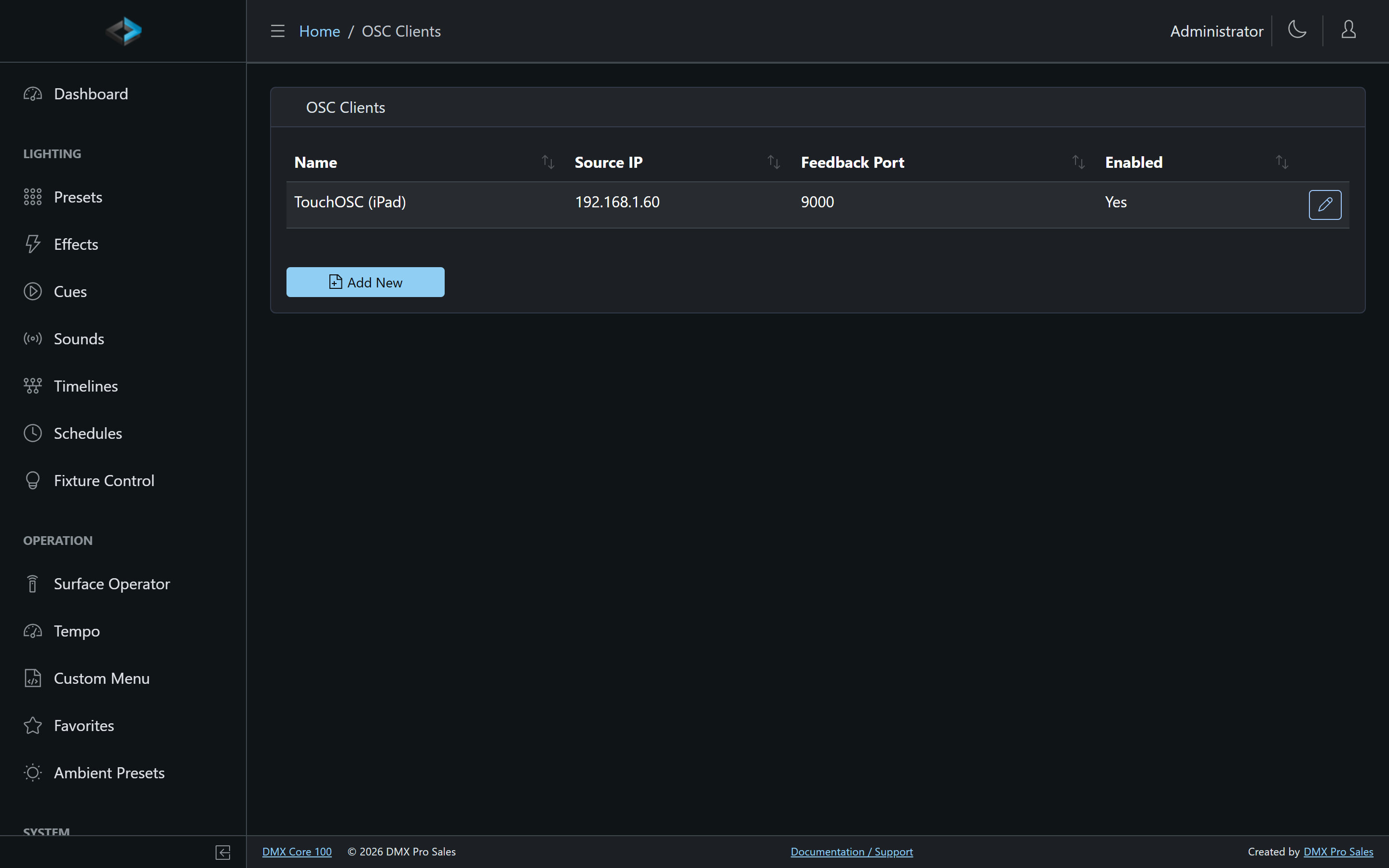
Register the controllers you want two-way communication with under Control & Integrations > OSC Clients - each client has a name, a source IP (or any), a feedback port, and Send device status updates, which turns the status feedback below on for it. Status messages - what’s playing, current levels, active states - are sent to the client’s feedback port, or to the port its messages come from when none is set, so your TouchOSC layout’s buttons and faders track reality.
A controller can also subscribe itself: a sender of /dmxcore/hello (or of /dmxcore/status) receives the status feedback at the port it sends from, with no client entry at all, until it has been silent for the any-source timeout (24 hours by default). A client entry for its IP, if there is one, decides instead. Devices that subscribed this way are listed under Subscribed Devices on the OSC Clients page, by the name their hello carried.
Both Subscribed Devices and Recent OSC Senders have a Clear button (for users with the Edit Control Surfaces and OSC Clients permission). Clearing the lists and then pressing a button on the controller shows exactly what arrives. A cleared subscribed device receives feedback again only after its next /dmxcore/hello; a cleared sender reappears under Recent OSC Senders with its next message.
The first message from a client after a minute of silence (a /ping counts) also gets it the full status set, the same one /dmxcore/hello brings, so a panel that started after the device or woke from sleep is right from its first tap.
Feedback Address Reference
| Address | Value | Sent when |
|---|---|---|
/dmxcore/status/text | string | Playback state changes - e.g. Playing 'ACT1', Fixture control, Stopped, Recording, Previewing. |
/dmxcore/status/cue | string | Playback state changes - the code of the playing cue, or empty when none. |
/dmxcore/status/playing | 1 / 0 | Playback state changes - whether a cue, timeline or sound is playing. |
/dmxcore/status/light /dmxcore/status/sound | 1 / 0 | Playback state changes - whether light (something playing, or fixture control) and sound are being output. |
/dmxcore/cue/<code> /dmxcore/timeline/<code> /dmxcore/sound/<code> /dmxcore/preset/<code> /dmxcore/effect/<code> | 1 / 0 | 1 for every item playing, applied or running, on every playback state change; 0 once when it stops. The address is the item’s trigger address, with the code exactly as stored, so the button that starts an item is also its indicator. An effect’s state follows within about half a second. |
/dmxcore/dimmer/master | level | The master dimmer changes. |
/dmxcore/fadetime | ms | Sent to one sender only, on its /dmxcore/hello, /dmxcore/status or /dmxcore/fadetime, and on its first message after a minute of silence: the fade time that sender’s presets use - its own, or the device default when it has none. |
/dmxcore/fixture/red /dmxcore/fixture/green /dmxcore/fixture/blue | level | The global fixture-control color changes. |
/dmxcore/control/<code> | level | A Control Value changes (the code exactly as stored): a Level as 0–1, a Toggle as 1/0, a Selector as its choice index. |
A client that sets a level over OSC is treated as the master for that address for one second and does not receive its own value echoed back, so a fader being dragged doesn’t fight the feedback. Item states are the exception: the button that was just pressed gets its light.
An input trigger on an address of your own is for input only. Nothing is sent back on its address: the state of what it plays goes out on that item’s address, so a /grandhall/storm trigger that plays the timeline THUNDER is answered on /dmxcore/timeline/THUNDER.
Control surfaces bound to an OSC client additionally send state for each assigned address, using the binding’s own address path.
Sending OSC from the Device
The DMX Core 100 can also send OSC: as an output event when something happens, as an OSC direct message item in a custom menu, or from a script via dmx.osc.send().